Modern local image effects

Image Color Quantizer

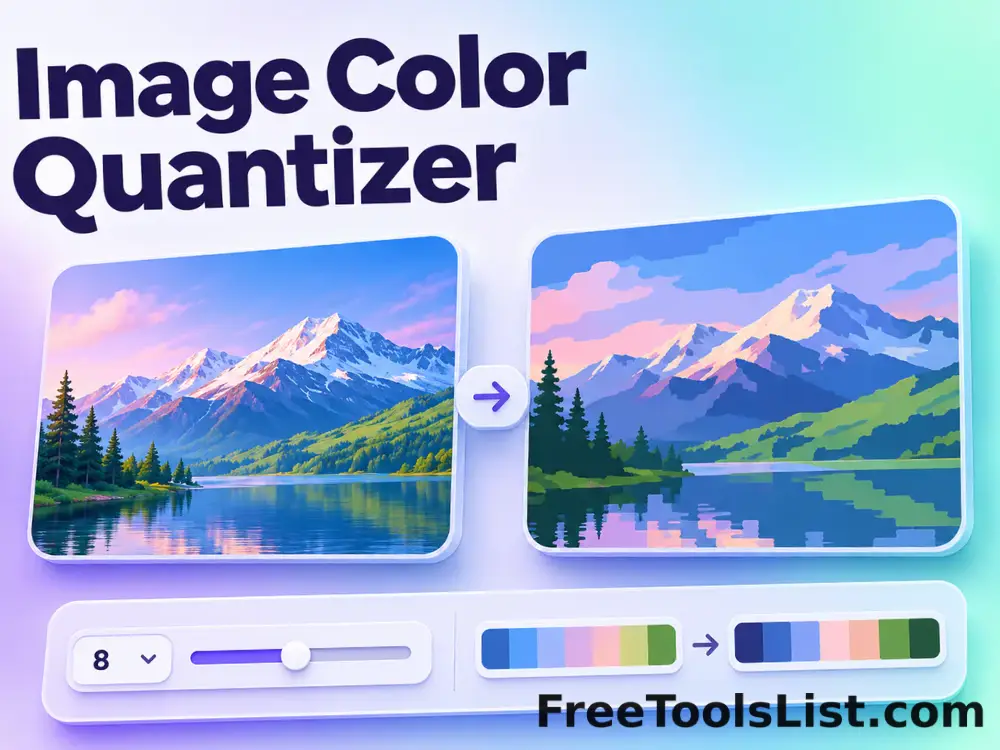
Reduce an image to a controlled palette with balanced RGB quantization, optional ordered dithering, adjustable dither strength and an exact output preview.

● Real canvas · Browser-local · Original safe

Image Color Quantizer workspace

Apply the effect, inspect the actual canvas and save only after the output looks right.

Local · no external uploads

Loading the effect workspace…

Quick Tool Overview

Color Quantizer with reviewable output.

Use Image Color Quantizer to limit the approximate number of colors for stylized graphics, compact assets, retro artwork and palette experiments.

The tool chooses balanced red, green and blue level counts whose product stays within the requested palette limit, then maps every pixel to those levels with optional ordered dithering.

LIVECanvas preview
LOCALPrivate processing
PALFocused effect
0Accounts needed
Review before saving. The requested number is an upper bound on generated palette slots, not a promise that every slot appears. Dithering adds visible pixel patterns and can increase compressed file size.
About the Tool

What Image Color Quantizer does.

Primary purpose

Use this page to limit the approximate number of colors for stylized graphics, compact assets, retro artwork and palette experiments.

Transparent method

The tool chooses balanced red, green and blue level counts whose product stays within the requested palette limit, then maps every pixel to those levels with optional ordered dithering.

Actual output preview

The preview is drawn from the processed pixel result and includes an interactive comparison before export.

Private local workflow

Source pixels stay in this browser tab and are not sent to an external effect-processing API.

Original-safe export

The source is only read. Every effect result is encoded as a separate PNG, JPEG or WebP download.

Important limitation

The requested number is an upper bound on generated palette slots, not a promise that every slot appears. Dithering adds visible pixel patterns and can increase compressed file size.
Key Features

A modern effect workspace built for inspection.

◫

Real live canvas

Review the processed pixels before the save button becomes available.

↔

Before and after

Drag the comparison slider to inspect details, gradients and edges.

⌂

Local processing

The effect runs in this tab without a remote upload queue.

↓

Flexible export

Save the reviewed result as PNG, JPEG or WebP with quality control.

How to Use Image Color Quantizer

Apply and review the effect in six detailed steps.

Choose or load an image

Select a local browser-readable image or load the demonstration. The source file remains unchanged.

Step 1: Keep the untouched source until the result is verified.

Set the effect controls

Adjust maximum palette colors, dithering mode, dither strength, alpha preservation, output format and quality. Start with moderate settings so the comparison remains easy to judge.

Step 2: Keep the untouched source until the result is verified.

Render the live canvas

Click Apply and wait for the actual processed pixels to appear. The save button stays disabled until encoding succeeds.

Step 3: Keep the untouched source until the result is verified.

Compare before and after

Drag the comparison slider across detailed and flat parts of the image to see exactly where the effect changes pixels.

Step 4: Inspect both fine detail and broad tonal areas.

Review measurements

Check output dimensions, encoded size, format and operation summary. The requested number is an upper bound on generated palette slots, not a promise that every slot appears. Dithering adds visible pixel patterns and can increase compressed file size.

Step 5: Keep the untouched source until the result is verified.

Save the reviewed copy

Download the new image only after the canvas matches the intended look. Keep the original available for future edits.

Step 6: Keep the untouched source until the result is verified.

Ready to apply the effect?

Preview the complete result before saving.

No external upload queue, account, watermark or source overwrite.

Open Color Quantizer →

Frequently Asked Questions

Popular color quantizer questions.

The tool chooses balanced red, green and blue level counts whose product stays within the requested palette limit, then maps every pixel to those levels with optional ordered dithering.

No. Image decoding, effect processing, canvas comparison and encoding happen in the current browser tab on localhost.

Yes. The page shows the actual processed canvas, output dimensions, encoded size and a draggable before-and-after comparison before download.

No. The source is read only and the effect is exported as a separate file with a descriptive filename.

Begin with the defaults, inspect the canvas, and change one major control at a time. Moderate settings usually retain more useful detail.

Image editors may use different kernels, color spaces, edge handling and encoders. This page reports its method and displays the exact local result.

Keep exploring

Similar Tools

Continue with related free tools selected from this category and the wider directory.

20 tools
Add Noise to Image tool previewANImages

Add Noise to Image

Add Noise to Image lets you add controllable monochrome or color grain locally in your browser, compare the result, and download a ready-to-use file.

Auto Levels Image tool previewALImages

Auto Levels Image

Normalize photo brightness and color levels automatically using per-channel RGB or luminance-only correction with clipping and strength controls.

Bulk Add Noise to Image tool previewBAImages

Bulk Add Noise to Image

Process multiple images locally to add controllable monochrome or color grain, review every result, and download the completed batch as a ZIP.

Bulk Adjust Image Hue tool previewBAImages

Bulk Adjust Image Hue

Process multiple images locally to rotate every color around the HSL hue wheel, review every result, and download the completed batch as a ZIP.

Bulk Change Image Saturation tool previewBCImages

Bulk Change Image Saturation

Process multiple images locally to increase or reduce color intensity while preserving hue, review every result, and download the completed batch as a ZIP.

Bulk Change Image Vibrance tool previewBCImages

Bulk Change Image Vibrance

Process multiple images locally to boost muted colors more gently than already-saturated colors, review every result, and download the completed batch as a ZIP.

Bulk Color Emboss Image Effect tool previewBCImages

Bulk Color Emboss Image Effect

Process multiple images locally to apply an emboss kernel while retaining color channels, review every result, and download the completed batch as a ZIP.

Bulk Colorize Image tool previewBCImages

Bulk Colorize Image

Process multiple images locally to blend a chosen color into the source image, review every result, and download the completed batch as a ZIP.

Bulk Duotone Image Effect tool previewBDImages

Bulk Duotone Image Effect

Process multiple images locally to map shadows and highlights to two chosen colors, review every result, and download the completed batch as a ZIP.

Bulk Grayscale Image tool previewBGImages

Bulk Grayscale Image

Process multiple images locally to convert color pixels to a luminance-based monochrome image, review every result, and download the completed batch as a ZIP.

Bulk Image Palette Extractor tool previewBIImages

Bulk Image Palette Extractor

Extract color palettes from up to 20 images in one local batch and download a combined CSV.

Bulk Invert Image Colors tool previewBIImages

Bulk Invert Image Colors

Process multiple images locally to reverse every RGB channel to create a photographic negative, review every result, and download the completed batch as a ZIP.

Bulk Pixelate Image tool previewBPImages

Bulk Pixelate Image

Process multiple images locally to replace fine detail with larger blocks of sampled color, review every result, and download the completed batch as a ZIP.

Bulk Posterize Image tool previewBPImages

Bulk Posterize Image

Process multiple images locally to reduce each channel to a controlled number of color levels, review every result, and download the completed batch as a ZIP.

Change Image Saturation tool previewCIImages

Change Image Saturation

Change Image Saturation lets you increase or reduce color intensity while preserving hue locally in your browser, compare the result, and download a ready-to-use file.

Change Image Vibrance tool previewCIImages

Change Image Vibrance

Change Image Vibrance lets you boost muted colors more gently than already-saturated colors locally in your browser, compare the result, and download a ready-to-use file.

Color Emboss Image Effect tool previewCEImages

Color Emboss Image Effect

Color Emboss Image Effect lets you apply an emboss kernel while retaining color channels locally in your browser, compare the result, and download a ready-to-use file.

Colorize Image tool previewCIImages

Colorize Image

Colorize Image lets you blend a chosen color into the source image locally in your browser, compare the result, and download a ready-to-use file.

Cracked Photo Effect tool previewCPImages

Cracked Photo Effect

Overlay a repeatable branching crack network with density, relief, width, color and seed controls before saving the reviewed image.

Dominant Color Frame Studio tool previewDCImages

Dominant Color Frame Studio

Build a striped photo border from colors sampled from the image with independent side widths, palette size, blur, rotation and saturation controls.

PublishedUpdated